Changing a model name is easy; discovering that an old reasoning parameter is rejected is the expensive part. GLM 5.3 vs 5.2 should be evaluated as both a capability upgrade and an integration migration. Keep your working application as the baseline while testing what actually changes.
This article uses Z.ai's official model card, model documentation, pricing, and Coding Plan guidance reviewed November 13, 2026. It separates the vendor's post-training claims from steps you can verify in your own application. We did not independently reproduce the public benchmarks.
GLM 5.3 vs 5.2: same base, different post-training
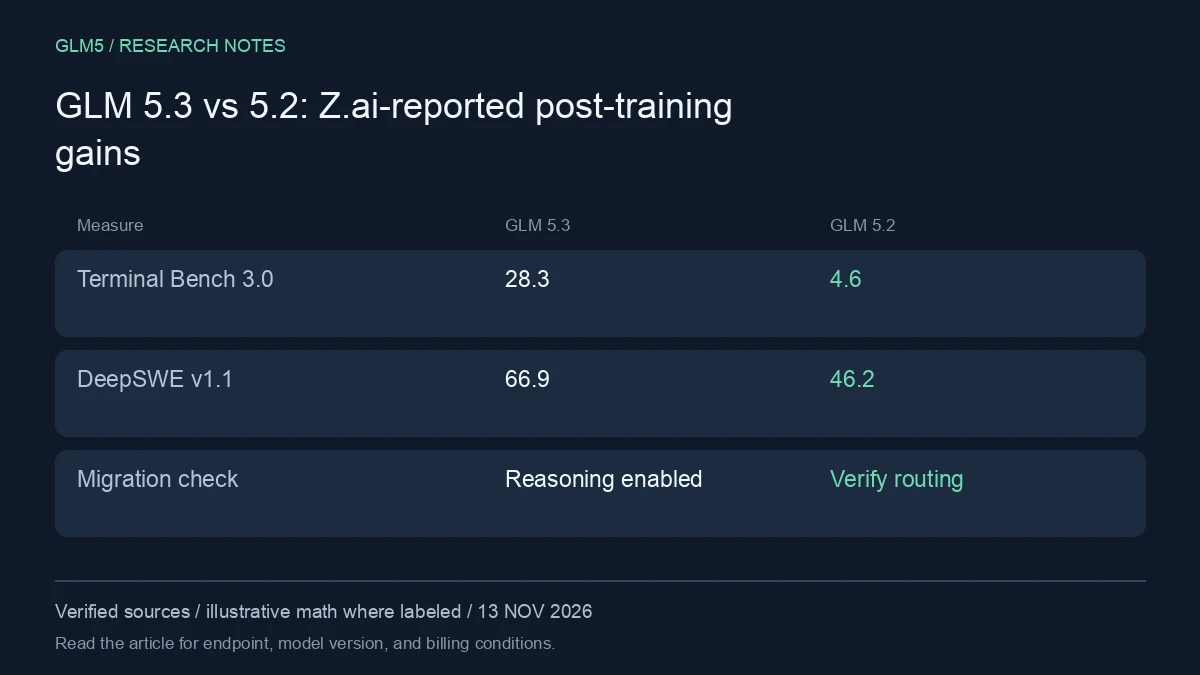
Z.ai states that GLM 5.3 uses the same base model as GLM 5.2 and attributes the gains to post-training. Its published table reports an increase from 4.6 to 28.3 on Terminal Bench 3.0 and from 46.2 to 66.9 on DeepSWE v1.1. These are vendor-reported results under specified evaluation conditions, not a promise for every user task.
That distinction matters for GLM 5.3 vs 5.2: a post-training improvement does not mean every established prompt will behave identically. Output style, task persistence, and tool decisions still deserve regression checks.
Check reasoning controls before rollout
The GLM 5.3 documentation says reasoning is always enabled, with low, high, and max effort levels. A client that assumes reasoning can be disabled must be adapted to the documented behavior. Verify the wrapper's parameter names and support instead of assuming generic OpenAI-compatible syntax exposes every provider feature.
Run a small request first, then test streaming, tool calls, structured output, cancellation, and long answers. Capture the provider error body for unsupported parameters. A compatibility failure at the request boundary should not be mistaken for weak model performance.
Confirm whether you still have a genuine 5.2 baseline
The current Coding Plan overview says requests for GLM 5.2 and GLM 5.1 are automatically routed to GLM 5.3. That means comparing two requested names inside that product may compare the same served model. Use a documented pinned endpoint when an actual historical baseline is required, or clearly label the routing limitation.
This is a central GLM 5.3 vs 5.2 migration trap: the requested ID and served model are different pieces of evidence. Save response metadata and provider routing information with your results.
Plan a reversible migration
Keep representative prompts, expected output schemas, tool fixtures, and response-length limits in a regression set. Run the candidate against it before changing the production default. If your system needs strict JSON, validate the actual output rather than relying on a model's explanation that it produced valid JSON.
Both model rows currently show the same standard direct Z.ai fresh-input and output rates. Equal token prices do not imply equal task cost: answer lengths and retry counts may change. Compare the ledger before and after rollout, including failed attempts. In GLM 5.3 vs 5.2, the strongest reason to migrate is a verified improvement on work you already perform.
Run a comparison that survives contact with your codebase
Begin with three representative jobs: a narrow bug with a failing test, a change spanning several files, and an investigation where the correct result is an explanation rather than a patch. Write acceptance criteria before either model sees the task. Keep a clean checkout for each run so a previous answer cannot leak into the next attempt.
Hold the agent wrapper constant where both models support it: system instructions, repository access, test commands, timeout, and tool permissions. Record any unavoidable difference. A model with search access should not be compared with one denied the source material needed to solve the problem. Save exact model IDs, dates, effort settings, provider routes, and token usage.
| Measure | What to record | Why it changes the purchase decision |
|---|---|---|
| Correctness | Passing acceptance tests and manual review | A plausible patch can still be wrong |
| Completion | Finished result before the deadline | A partial answer creates more work |
| Cost | Every attempt, tool fee, and repair call | First-call price hides retries |
| Latency | First useful output and total completion | Fast streaming can conceal a slow task |
| Review effort | Minutes spent finding and fixing defects | Human time can dominate token spend |
Run each task more than once if your budget permits. Small samples are a screening exercise, not a statistically established ranking. Keep failed runs in the results. If a tool call breaks because of a wrapper mismatch, classify that failure separately from a reasoning error, fix the integration, and rerun both candidates under equivalent conditions.
You can try a representative prompt in GLM5 Chat, then use the API documentation for a repeatable integration. Only compare models actually listed by your chosen endpoint; a provider may expose an alias rather than the exact historical checkpoint named in a chart.
Troubleshooting an unexpected result
A model that stops early may have hit an output ceiling, timeout, or tool error. Inspect the finish reason and logs before concluding that it cannot solve the task. For an irrelevant answer, first check whether the important files reached the model. For a surprisingly expensive run, examine repeated history, uncached prefixes, reasoning output, and repair attempts.
Do not increase context size as the first fix for every failure. Supply the files and test output needed for the next decision, preserve a concise task state, and set a spending limit. A long agent loop needs a stopping condition as much as it needs a capable model.
FAQ
Is there a universal winner?
No. Glm 5.3 vs 5.2 depends on input types, the exact served version, and the work you need accepted. Use the decision criteria above rather than treating a single public score as a guarantee.
Can I test without moving my whole application?
Yes. Keep your existing route and run a small evaluation through a separate configuration. Check the endpoint's model catalog first, impose a budget, and keep the original traces for review.
What should I do after the trial?
Choose the route that passes your quality threshold at an acceptable total cost. Review GLM5's model catalog and pricing options before committing a larger workload.
Sources
- GLM 5.3 model card and evaluation notes
- GLM 5.3 model documentation
- Z.ai official API pricing
- GLM Coding Plan allowances and multipliers
Source review: November 13, 2026. Prices and allowances are snapshots. Calculations in this article are illustrative, not measured production bills. GLM5 is the publisher of this article and a separate service from Z.ai.