A coding model can look inexpensive until a failed migration requires an afternoon of repair. GLM 5.3 vs Opus 5.5 is a choice about that tradeoff: token spend, accepted changes, and the cost of reviewing a long-running agent.
This article compares official Z.ai documentation with Anthropic's Opus 5.5 announcement, reviewed November 13, 2026. We did not run a private benchmark. Instead of inventing a shared leaderboard, we separate verified prices from a reproducible method for deciding which model earns its cost.
GLM 5.3 vs Opus 5.5: verified prices
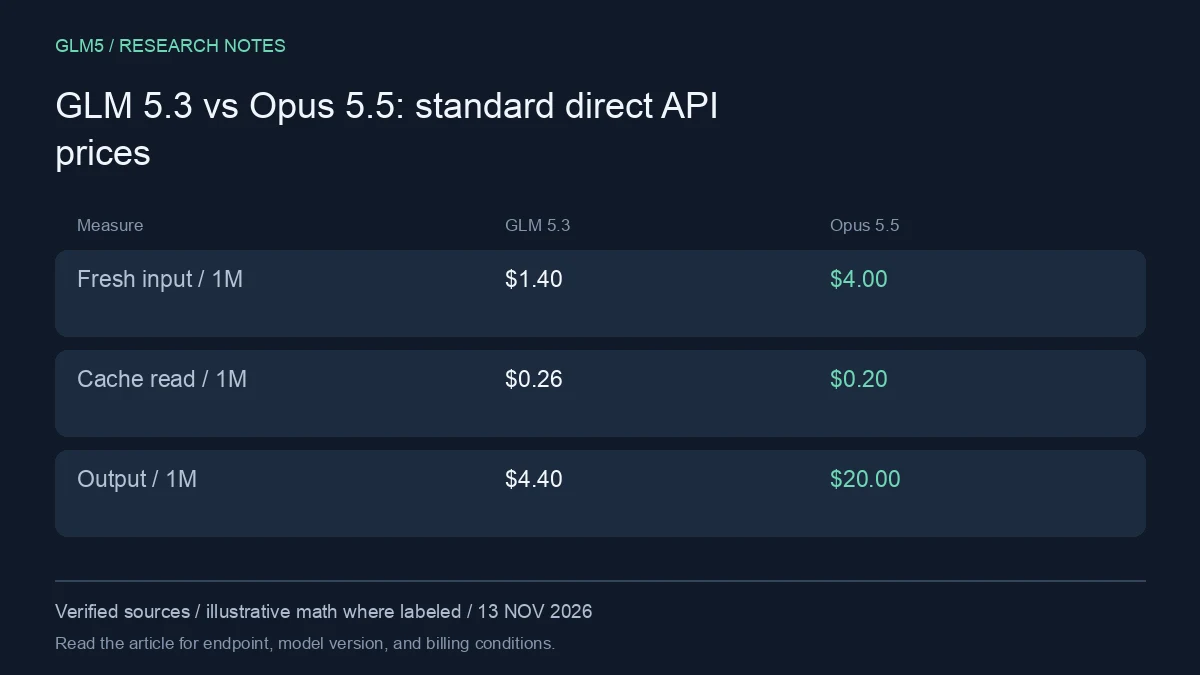
| Direct provider rate, per million tokens | GLM 5.3 | Claude Opus 5.5 |
|---|---|---|
| Fresh input | $1.40 | $4.00 |
| Cache read | $0.26 | $0.20 |
| Output | $4.40 | $20.00 |
The cache-read row matters. A blanket statement that one model is cheaper on every token category would be incorrect. Anthropic separately lists cache writes and a more expensive fast mode; Z.ai's pricing page has its own caching terms. Do not combine the cheapest category from one product with the billing rules of another.
Calculate the bill for the shape of your workload
With 100,000 fresh input tokens and 10,000 output tokens, the illustrative direct bill is $0.184 for GLM 5.3 and $0.600 for standard Opus 5.5. For 100,000 billed cache-read tokens plus the same output, the totals become $0.070 and $0.220, before any cache creation or other fees.
That makes GLM 5.3 vs Opus 5.5 a more useful question than a single price ratio. A chatty agent can generate substantially different output volumes across models. A model that uses fewer steps may reduce tool charges and repeated context. Compare the actual trace, not an assumed identical token count after the fact.
Why the public benchmark numbers are not a shared test
Anthropic's Opus 5.5 announcement reports newer evaluation suites and effort settings. Z.ai's GLM 5.3 card includes its own historical comparison table. An Opus 4.8 entry in that table is not an Opus 5.5 result, and Terminal-Bench versions are not interchangeable.
For a defensible GLM 5.3 vs Opus 5.5 evaluation, pin the task suite and both model versions yourself. Use public results to choose which tasks to test, not to manufacture a percentage-point gap across incompatible benchmark generations.
Who should shortlist each model?
Shortlist GLM 5.3 if direct token economics, weight availability, or a lower-cost reasoning path are important to your deployment. Check the actual weight license rather than assuming every GLM release uses the same license. Shortlist Opus 5.5 if your workflow depends on Anthropic's agent ecosystem or your own acceptance tests justify its output-token premium.
A practical GLM 5.3 vs Opus 5.5 trial should include one task where correctness is easy to verify and one where a reviewer must inspect architectural choices. You want to discover which model creates less work for your team, not just which produces a larger patch.
Run a comparison that survives contact with your codebase
Begin with three representative jobs: a narrow bug with a failing test, a change spanning several files, and an investigation where the correct result is an explanation rather than a patch. Write acceptance criteria before either model sees the task. Keep a clean checkout for each run so a previous answer cannot leak into the next attempt.
Hold the agent wrapper constant where both models support it: system instructions, repository access, test commands, timeout, and tool permissions. Record any unavoidable difference. A model with search access should not be compared with one denied the source material needed to solve the problem. Save exact model IDs, dates, effort settings, provider routes, and token usage.
| Measure | What to record | Why it changes the purchase decision |
|---|---|---|
| Correctness | Passing acceptance tests and manual review | A plausible patch can still be wrong |
| Completion | Finished result before the deadline | A partial answer creates more work |
| Cost | Every attempt, tool fee, and repair call | First-call price hides retries |
| Latency | First useful output and total completion | Fast streaming can conceal a slow task |
| Review effort | Minutes spent finding and fixing defects | Human time can dominate token spend |
Run each task more than once if your budget permits. Small samples are a screening exercise, not a statistically established ranking. Keep failed runs in the results. If a tool call breaks because of a wrapper mismatch, classify that failure separately from a reasoning error, fix the integration, and rerun both candidates under equivalent conditions.
You can try a representative prompt in GLM5 Chat, then use the API documentation for a repeatable integration. Only compare models actually listed by your chosen endpoint; a provider may expose an alias rather than the exact historical checkpoint named in a chart.
Troubleshooting an unexpected result
A model that stops early may have hit an output ceiling, timeout, or tool error. Inspect the finish reason and logs before concluding that it cannot solve the task. For an irrelevant answer, first check whether the important files reached the model. For a surprisingly expensive run, examine repeated history, uncached prefixes, reasoning output, and repair attempts.
Do not increase context size as the first fix for every failure. Supply the files and test output needed for the next decision, preserve a concise task state, and set a spending limit. A long agent loop needs a stopping condition as much as it needs a capable model.
Revisit the decision after a model update or a material change in your task mix. Save the previous evaluation so improvements and regressions remain visible.
FAQ
Can I compare both through the same endpoint?
Only if that endpoint lists both exact model IDs. OpenAI-compatible syntax does not guarantee identical effort controls, tool behavior, or cache policy. Check the current catalog before writing a routing rule.
Is Opus 5.5 always the better coding choice?
Official release claims do not settle performance on your repository. In GLM 5.3 vs Opus 5.5, use accepted changes, total cost, and review time to make that decision.
What is the smallest useful next step?
Take one previously resolved issue, hide the original patch, and compare both candidates against its tests. Start with GLM5's API guide for the GLM side, and review the catalog before choosing a second model.
Sources
- GLM 5.3 model documentation
- Z.ai official API pricing
- Anthropic Opus 5.5 release and Opus 5 price comparison
- GLM5 API model IDs and credit rates
Source review: November 13, 2026. Prices and allowances are snapshots. Calculations in this article are illustrative, not measured production bills. GLM5 is the publisher of this article and a separate service from Z.ai.